Posts

Dumps for Microsoft Dynamics CRM MB2-703 Practice Exam Questions Free

Dumps for Microsoft Dynamics CRM MB2-703 Practice Exam Questions Free...!!! After a lot of net surfing i got few questions for passing out the exam for certification in Microsoft Dynamics CRM MB2-703 Practice Exam Questions. I think you will find it helpful and please comment if it helped you. Although this is just a shortcut for passing exam but it really helps a lot to clear exam in short duration of time. Note:: Don't blame if question doesn't matches as i have only collected questions and provided all at a single place and there is no guaranty that this will definitely come in exam. Apart from this you should go through CRM 2011 MB2- 866 dumps also. Topics and their percentage share in MB2-703 Exam: Create and Customize Solutions (10-15 percent) Customize Entities and Entity Relationships (10-15 percent) Customize Fields (10-15 percent) Manage Forms (10-15 percent) Manage Views (10-15 percent) Create and Customize Charts and Dashboards (10-15 pe...
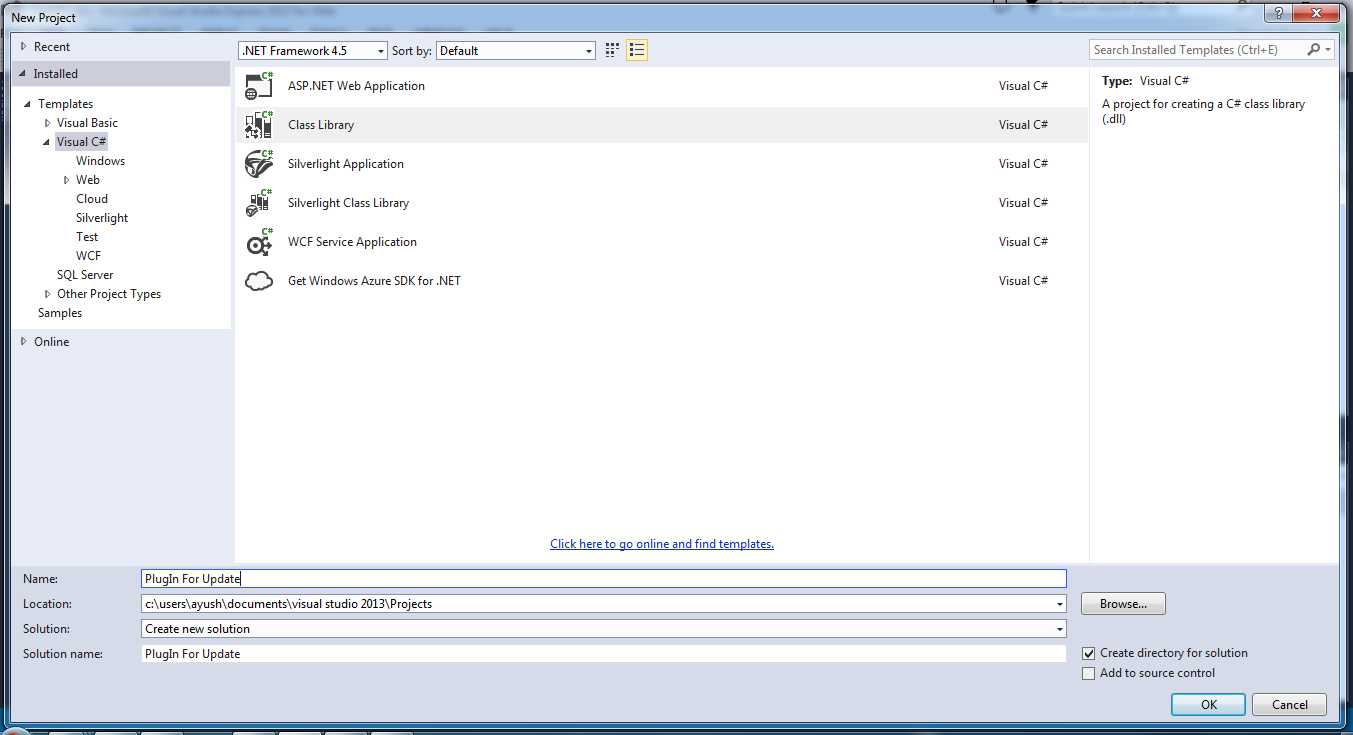
Developing a very basic Plug-in for Microsoft Dynamics CRM

Image
Developing a very basic Plug-in for Microsoft Dynamics CRM In this blog i am going to share how to develop a very basic plug-in for CRM step-by-step. Just follow each and every step and you will create your first Plugin very easily. 1. Download CRM SDK. This will provide you all the information, required SDK assemblies and many helpful samples. (Download Link for SDK : http://www.microsoft.com/en-in/download/details.aspx?id=40321 ) 2. Set up your plug-in project in Visual Studio. This will be a .NET class library. 3. Add References. At minimum, you will need Microsoft.Xrm.Sdk, obtained from CRM SDK. 4. Extend the class from Microsoft.Xrm.Sdk.IPlugin 5. Write your code (Below a very basic example is given after step 7. write codes in the code area in box shown)  6. At the project, sign the assembly. This is required in order to be able to deploy the plugin.  7. Compile the assembly and deploy using Plugin Registration Tool. (Use this link to know more abou...

Understand the Data Context Passed to a Plug-in (Microsoft Dynamics CRM)

In this blog i am going to share the definition and meaning of Data Context passed to a Plug-in (Microsoft Dynamics CRM) ==>  IPluginExecutionContext contains information that describes the run-time environment that the plug-in is executing in, information related to the execution pipeline, and entity business information. The context is contained in the System.IServiceProvider parameter that is passed at run-time to a plug-in through its Execute method. C# // Obtain the execution context from the service provider.             IPluginExecutionContext context = (IPluginExecutionContext)                 serviceProvider.GetService(typeof(IPluginExecutionContext)); When a system event is fired for which a plug-in is registered, the system creates and populates the context and passes it to a plug-in through the above mentioned classes and metho...

Search data in Gridview on Textbox Key press event using JQuery in Asp.Net- C#

Image
First of all add the following .js file, Link and the JavaScript to your <Head> tag :: <head runat="server">     <title></title>    <script type="text/javascript" src="http://ajax.googleapis.com/ajax/libs/jquery/1.8.3/jquery.min.js"></script> <script type="text/javascript" src="js/quicksearch.js"></script> <script type="text/javascript">     $(function () {         $('.search_textbox').each(function (i) {             $(this).quicksearch("[id*=gvDetails] tr:not(:has(th))", {                 'testQuery': function (query, txt, row) {                     return $(row).children(":eq(" + i + ")").text().toLowerCase().indexOf(que...

Selecting GridView Row by clicking anywhere on the Row in Asp.Net - C#

Image
In this blog I am going to how to show how to select GridView Row when mouse is clicked anywhere on the GridView Row in ASP.Net- C#   First of all add a page to your solution and add a gridview, a link button which will be used to render ASP.Net _doPostBack JavaScript as it requires for RowSelection. <head runat="server">     <title></title> <style type="text/css">     body     {         font-family: Arial;         font-size: 10pt;     }     td     {         cursor: pointer;     }     .hover_row     {         background-color: #A1DCF2;     } </style>  <script type="text/javascript">      $(function () {  ...

Building Modal Popup using ASP.Net AJAX ModalPopupExtender Control

Image
In this blog I will explain with an example how to build a Modal Popup ASP.Net AJAX ModalPopupExtender control. First of all register the AJAX Control Toolkit Library by putting the following line just below the @PageDirective :: <%@ Register Assembly="AjaxControlToolkit" Namespace="AjaxControlToolkit" TagPrefix="asp" %> Now add the following code inside the <body> tag :: <form id="form1" runat="server">     <asp:ScriptManager ID="ScriptManager1" runat="server">     </asp:ScriptManager>     <div>         <asp:Button ID="BtnShow" runat="server" Text="Show Modal PopUp" BackColor="Yellow"             BorderStyle="Groove" />         <asp:ModalPopupExtender ID="ModalPopupExtender1" PopupControlID="Panel1" TargetControlID="BtnShow" CancelControlID="BtnClose" Backgro...

Bind image in gridview and Show image on Hover over specific column in GridView (Show image as ToolTip on Mouseover in GridView) in Asp.Net C#

Image
In this blog, I am going to show how to bind images in gridview and show this image on mouseover over any link/ image         Here, i have have shown how a image can be used as a tooltip in gridview. First of all, Write the below code in .aspx page and don't forgot to add "jquery.tooltip.min.js" and "jquery-1.8.2.js" to your solution. Just search it on google and you will get this .js file easily <%@ Page Language="C#" AutoEventWireup="true" CodeFile="GridViewToolTipaspx.aspx.cs" Inherits="GridViewToolTipaspx" %> <!DOCTYPE html PUBLIC "-//W3C//DTD XHTML 1.0 Transitional//EN" "http://www.w3.org/TR/xhtml1/DTD/xhtml1-transitional.dtd"> <html xmlns="http://www.w3.org/1999/xhtml"> <head runat="server">     <title></title>     <script src="http://code.jquery.com/jquery-1.8.2.js" type="text/javascript"></scri...
go to top image